If you are setting up a 5G Fixed Wireless Access (5G FWA) network for a modern office and running your entire business on mobile data, the equipment you choose dictates your daily uptime.
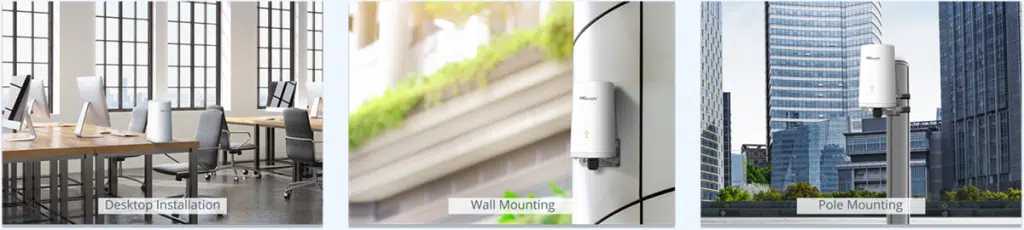
When evaluating options, it is easy to look at mainstream, consumer-prosumer hardware like the EE Smart 5G Hub 7 series (manufactured by Arcadyan and powered by Qualcomm) and assume it wins because of “bigger numbers.” The newest EE hubs feature the brand-new Wi-Fi 7 standard, while commercial workhorses like the Milesight UF51 5G Router use Wi-Fi 6.
But in a 5G-only office, focusing entirely on the Wi-Fi generation is a critical mistake. If your router cannot efficiently handle heavy data processing, manage cellular bands, or pull a clean signal through building walls, the fastest local Wi-Fi standard in the world won’t keep your team online.
Here is a side-by-side look at why a dedicated, professional FWA platform like the Milesight UF51 is the superior choice for a 5G-powered workspace.
The Windowsill Sun-Trap: Industrial Thermal Design vs. Consumer Plastic
When running an office entirely on 5G, placement is everything. To get the absolute best cellular signal, you naturally want to position your 5G router right on a windowsill. However, this introduces a major environmental hazard that quietly cripples consumer hardware: solar radiation and extreme heat.
Windowsills act like mini-greenhouses. On a sunny day, a device sitting behind glass can easily experience ambient temperatures climbing well past 40°C.
- The Consumer Fail Point: Lightweight, plastic hubs like the EE Smart Hub 7 are built for climate-controlled living rooms. When subjected to direct sunlight and heavy network load simultaneously, their consumer chipsets overheat. To protect themselves from melting, they engage in thermal throttling—drastically dropping your 5G speeds, dropping client connections, or rebooting entirely in the middle of a business day.
- The Milesight Engineering: The Milesight UF51 is built like a tank. Housed in a heavy-duty, UV-protective polycarbonate and cast-aluminium enclosure, it features an industrial wide-temperature architecture operating flawlessly from -30°C to +60°C. It is engineered to bake on a scorching south-facing window (or even mounted completely outdoors) while maintaining maximum processing throughput. It simply does not thermal throttle, keeping your business running when the sun beats down.
The Processing Myth: Why Dedicated ARM Architecture Wins
Even when kept out of the sun, processing power under load matters. The EE Smart Hub 7 series uses consumer-focused processing chips optimized for residential media streaming and short bursts of high speed.
By contrast, the Milesight UF51 features an industrial Quad-core ARM Cortex-A55 processor operating at 2 GHz, paired with 1 GB of high-efficiency LPDDR4x RAM.
When 15 to 20 people in an office are simultaneously syncing cloud drives, routing data, opening browser tabs, and connecting to corporate VPNs, a router’s processor is subjected to relentless packet sorting. The Milesight’s ARM Cortex-A55 architecture is engineered from the ground up for high-efficiency, sustained mathematical processing. It processes incoming packets and distributes them to your team without breaking a sweat, ensuring consistent latency and eliminating the midday slowdowns common with consumer-grade gear.
5G Architecture Explained: NSA, SA, and Carrier Aggregation
To understand why professional hardware outperforms consumer hubs, we need to look at how a router talks to the cellular network. Not all 5G connections are created equal.
5G Non-Standalone (5G NSA) vs. 5G Standalone (5G SA)
- 5G NSA (Non-Standalone): This is the most common form of 5G deployed today. It uses an existing 4G LTE network core to handle the initial connection and control signaling, anchoring a 5G data lane on top for extra speed. While fast, it inherits the latency and capacity limitations of older 4G infrastructure.
- 5G SA (Standalone): This is true, pure 5G. It connects directly to a next-generation 5G core network. It drops latency significantly, increases upload speeds, and provides a much more stable connection for business tasks like video conferencing and VoIP.
The Power of Carrier Aggregation (CA)
Carrier Aggregation allows a router to combine multiple cellular frequencies (bands) into a single, wider pipe. Think of it like turning a single-lane road into a multi-lane highway.
While consumer hubs often focus on a single dominant indoor band, the Milesight UF51 features advanced 2CC CA (Two-Component Carrier Aggregation) across Sub-6 GHz 5G bands. This means it can simultaneously bind a low-frequency band (which travels far and penetrates walls easily, like $n28$) with a high-capacity mid-frequency band (which carries massive data but struggles with walls, like $n78$).
Because the UF51 continuously aggregates these bands, your office gets a reliable connection that balances speed and stability, even if one frequency fluctuates due to local network congestion.
The Wi-Fi 7 vs. Wi-Fi 6 Trap
The marketing for consumer hubs heavily pushes Wi-Fi 7 (802.11be). On paper, it looks superior to the Milesight’s Wi-Fi 6 (802.11ax). But let’s look at the actual math of a 5G-only office.
- The 5G Bottleneck: The real-world download speed of a high-performing UK 5G business connection under good conditions typically hovers between 150 Mbps and 600 Mbps.
- Wi-Fi 6 Capacity: Milesight’s Wi-Fi 6 engine comfortably handles data transmission up to 3.6 Gbps (3,600 Mbps).
Wi-Fi 6 provides several times the bandwidth that your 5G SIM card can physically deliver from the mast. Paying a premium for Wi-Fi 7 to handle an incoming 5G link is like building a ten-lane highway that merges directly into a single-lane country road. Wi-Fi 6 is completely optimal, highly stable, and works natively with every modern office laptop and smartphone on the market today without unnecessary overhead.
Side-by-Side Comparison: Professional FWA vs. Consumer Hub
| Feature | EE Smart 5G Hub 7 (Plus / Pro) | Milesight UF51 5G Router |
| Target Audience | Residential / Home Office | Commercial / Professional FWA |
| Chassis Build | Lightweight Desktop Plastic | Heavy-Duty Cast Aluminium |
| Operating Temp Range | Standard Indoor Only (Throttles in heat) | -30°C to +60°C (Industrial Thermal Rig) |
| Processor Platform | Consumer Chipset | Industrial Quad-Core ARM Cortex-A55 |
| System RAM | Standard DDR3/DDR4 | High-Efficiency 1GB LPDDR4x |
| Local Wi-Fi | Wi-Fi 7 (Overkill for Cellular Speeds) | Wi-Fi 6 (Perfect Match for 5G) |
| 5G Antenna Setup | Standard Internal Omnidirectional | 8 × High-Gain Directional Array |
| Power Flexibility | Fixed Mains UK Wall Plug | Mains Plug OR Power over Ethernet (PoE) |
Signal Capture: Where It Centrally Matters
Because this router lives indoors to run your office, signal capture is the most critical factor. Modern offices are built with concrete, steel brickwork, and low-emissivity (low-E) thermal glass. These materials act like a shield, blocking cellular frequencies from reaching your desk.
The Consumer Hub Limitation
The Arcadyan-built EE hubs feature a standard desktop layout designed to look good on a flat surface. If you place it in a central office location or a server closet, its standard internal omnidirectional antennas will struggle to pull a clean 5G signal through the building’s infrastructure, resulting in dropped connections and slow internet speeds.
The Milesight Advantage
The Milesight UF51 handles indoor interference through superior engineering:
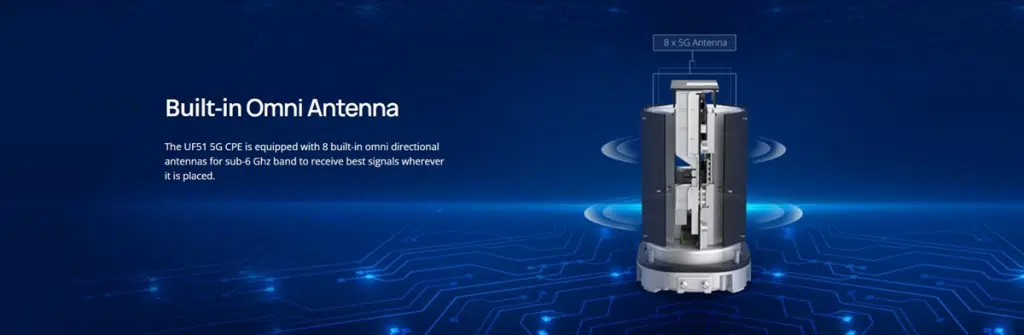
- Massive 8-Antenna Internal Array: Instead of relying on a couple of standard internal antenna traces, the UF51 packs eight distinct high-gain antennas inside its housing to actively hunt for and lock onto the strongest carrier waves.
- Inside-the-Office Mounting Flexibility: Consumer hubs require a standard wall socket, limiting where you can place them. The Milesight UF51 supports Power over Ethernet (PoE). This means you can run a single internet cable to the absolute best signal spot in the office—like high up on a wall, on top of a cabinet, or right against an upper-level skylight—and feed power and data through that single line back down to your team’s desks.
The Verdict: Why Milesight Takes the Win for Business FWA
The consumer type routers being sold for office 5G are fine for basic home use, but they are outclassed as business-critical 5G gateways.
The Milesight UF51 wins the matchup for an indoor, 5G-only office network because it prioritizes the features that matter for business continuity: an industrial ARM Cortex processor that won’t lag under heavy multi-user loads, robust environmental thermal protection that conquers windowsill heat, advanced 5G band aggregation to maximize your cellular link, a robust 8-antenna array that outperforms consumer hubs through thick walls, and a perfectly matched Wi-Fi 6 ecosystem that avoids the unnecessary cost and overhead of marketing buzzwords.
If you are ready to deploy a reliable, professional-grade 5G FWA solution for your office, you can purchase the platform here: